
Neat Devices: Version 26.4.0
Last updated on September 3, 2026
If you would like to receive email notifications for new releases, please subscribe here.
This document describes the Neat OS 26.4.0 Stable release for Neat Pad Generation 2, including firmware and app versions.
- Introduction
- Introducing Neat Pad Generation 2
- Device and app versions
- How to check your software and firmware version
- Need help? We’re here for you!
1. Introduction
Neat OS 26.4.0
On Thursday, September 3, we rolled out software updates for Neat Pad Generation 2 to our Stable Channel (Neat OS 26.4.0).
2. Introducing Neat Pad Generation 2
Introducing Neat Pad Generation 2 — a compact, versatile meeting room controller and scheduling display built to standardize and simplify every space.
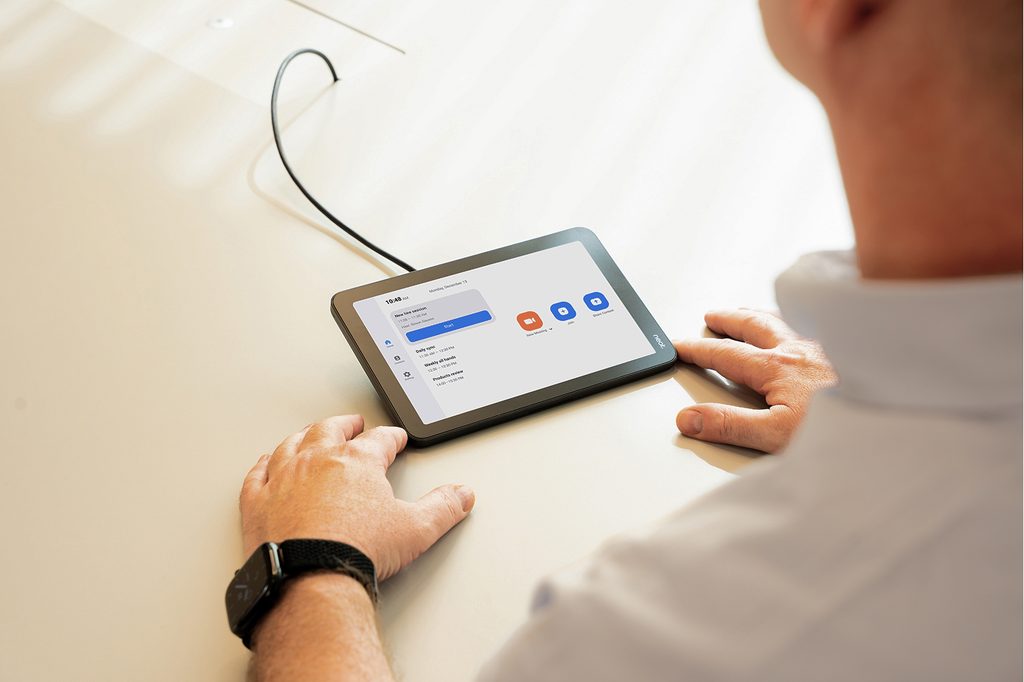
With a familiar 8-inch touchscreen and Neat’s next-generation P2 platform, Neat Pad Generation 2 keeps meetings moving. Use it inside the room as a controller to launch calls, manage participants, and share content with a single touch — or mount it outside to check availability and book a space at a glance.
Neat Pad Generation 2 works seamlessly with the leading video conferencing platforms, including Google Meet, Microsoft Teams, and Zoom.
A built-in microphone extends audio pickup across the room, while flexible wall, table, and mullion mounting options and a single Power over Ethernet (PoE) connection keep installation simple and clutter-free. Built-in Neat Sense sensors monitor temperature, humidity, and air quality, giving IT and facilities teams real-time insight into every space.
With seamless integration across your Neat devices and centralized management through Neat Pulse, Neat Pad Generation 2 brings together performance, flexibility, and simplicity — making it a reliable, scalable touchpoint for any modern meeting room.
See Neat Pad Generation 2 in action: https://neat.no/pad-2
3. Device and app versions
| Stable release (September 3, 2026) | |
| The Neat firmware builds: | Neat Pad Generation 2 firmware: NFA5.20260805.1808 Neat Pulse Agent: Pulse Agent 2.5.59 Built in Chromium version: M141 |
| The built-in Zoom Room versions. More information about the latest versions of Zoom can be found here: New Updates for Zoom Rooms Android Controller New updates for Zoom Room Appliances | Zoom Room Controller software version: 7.1.5 (5387) Zoom Room Appliance software version: 7.1.5 (10317) |
| The built-in Microsoft Teams versions: More information about the latest versions of Microsoft Teams can be found here: Release notes for Microsoft Teams Rooms on Android What’s new in Microsoft Teams devices – Teams Displays and Panels | – Admin Agent (856): 1.0.0.202607160723.product – Teams Rooms Devices (MTR-A 2.10.2) : 1449/1.0.96.2026144512 – Intune AOSP agent: 26.03.1 – Authenticator: 6.2606.4246 Microsoft Teams Panels: – Admin Agent (856): 1.0.0.202607160723.product – Panels (Panels 3.6.1): 1449/1.0.97.2026181101 – Intune AOSP agent: 26.03.1 – Authenticator: 6.2606.4246 |
4. How to check your software and firmware version
Here’s how to find out if your Neat device is running the latest build:
- For Zoom Rooms: Select Settings (bottom left) on your Neat Pad, then select About. You’ll see the Zoom software version on the right.
- For Microsoft Teams Panels (Neat Pad Generation 2 running as a scheduler): Tap the Settings icon on the Panels home screen, then go to Device settings → About to view the Microsoft Teams Panels version.
- For Neat Firmware: On your device, go to System Settings → System → About to find the firmware version and serial number.
You can also check the Zoom Room administrator portal or the Teams Admin Center (TAC) online to see the serial number and firmware version of your Neat devices.
Note for Neat Pads and devices enrolled in Neat Pulse: You can normally check for updates on the device’s Software Update page. But if any of your Neat devices are enrolled in Neat Pulse, that option will be greyed out. In that case, just head over to Neat Pulse to view and manage updates.
5. Need help? We’re here for you!
For quick answers and troubleshooting, check out our Neat Support website, where you’ll find helpful articles, FAQs, and step-by-step guides. We regularly update our content to make finding solutions easier.
If you need further assistance, our support team is ready to help! Simply raise a support ticket with us, and one of our technical support engineers will get back to you.
Privacy Policy: You can review our privacy policy here: Neat Privacy Policy.
Support Policy: Neat provides support for devices running the current or previous software release. For full details, see Neat’s Technical Support Policy.